Trading Assistant Software for AI Research and Analysis
AI trading bots can place trades according to rules, but they cannot guarantee profits. Trading assistant software helps organize research and analysis while leaving trade decisions in your hands. Historical tests and simulated trading show how a strategy performed under past or modeled conditions, not how it will perform in live markets. Plan for risk and follow your rules, since market conditions can challenge a strategy’s assumptions.
This guide explains what AI assistants can analyze, how technical and fundamental information can inform a trading plan, and what strategy testing can and cannot tell you. You’ll also learn how an assistant differs from a bot that places or manages trades automatically, helping you assess whether a tool supports your decisions or automates execution.
Key Takeaways
- See how AI can help organize market research across different asset classes, while recognizing that coverage depends on the data feeds, brokers, and exchanges involved.
- Learn what backtesting and forward testing can reveal about a strategy, and why past or simulated performance cannot settle how it will perform in live markets.
- Compare analysis tools that support your decisions with bots that can place or manage trades under defined rules.
- Explore how Dr. Cole’s TradingView Algos fit into a structured approach to market analysis and disciplined execution.
AI-powered trading assistant and market research
An AI assistant can organize market data, compare signals, and surface potential setups. To use those findings, connect them to a defined trading plan with clear rules.
Broker, Exchange, and Market-Data Connections
Connections determine which markets and account information an assistant can access. Coverage depends on its data feeds, brokers, and exchange connections. A stock-focused setup, for example, may not provide the same information as one connected to futures exchanges. Before relying on a signal, identify the instruments covered and confirm the data suits your analysis. A lost connection or missing feed can leave you working with incomplete information.
Real-Time Alerts and Market Monitoring
Alerts can flag a price level, chart condition, or watchlist change, helping you notice a setup without monitoring every screen continuously. Set notifications for specific conditions in your trading plan, then review whether a signal merits action. An alert is a prompt, not an instruction to trade. Record both the signal and your decision so you can review whether you followed your rules.
Market Scanning and Trading Ideas
Scanners filter instruments by selected conditions, such as a technical setup or movement in market data. StockHero, for example, is associated with bot creation and a strategy marketplace. These tools can surface trading ideas, but a listed strategy still needs review against its rules and historical behavior. Treat scan results as candidates for analysis, not ready-made trades. Compare each signal with market context and your planned risk.
Setup and Feature Selection
Choose and configure software by matching its features to the instruments you trade, your workflow, and the decisions you need to make. Prioritize charting, alerts, portfolio tracking, and automation based on what you need to monitor. Before enabling automation, understand its rules and permissions. In the United States, requirements and disclosures depend on a provider’s role and activities, not simply the software label. Identify whether the service provides analysis, executes trades, or does both, and review the relevant disclosures. Test the setup with simulated or historical data before relying on live signals.
Do AI trading bots actually work?
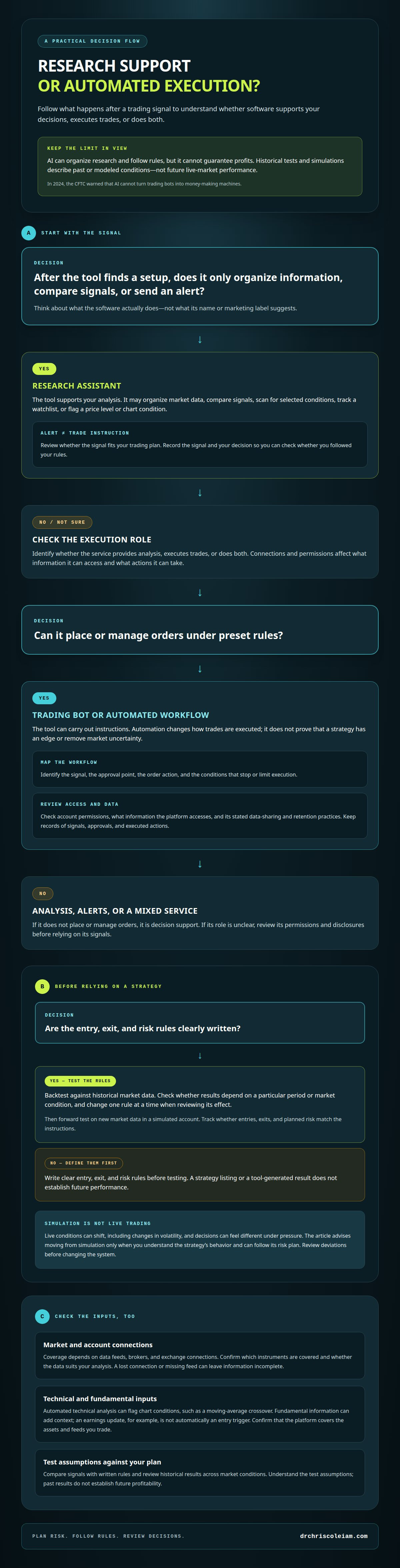
AI bots can follow strategies, but execution alone doesn’t prove an edge. In 2024, the CFTC warned that AI can’t turn trading bots into money-making machines.
Strategy Creation and Testing
Start by writing clear entry, exit, and risk rules. Backtest them against historical market data, then check whether the results depend on a particular period or market condition. A strategy developed in low volatility may behave differently when volatility rises. Change one rule at a time and rerun the test to see which decision affected the outcome.
A strategy marketplace can offer ideas, but a listing does not establish future performance. Review each strategy’s rules and the conditions used in its backtest. Check whether the test period reflects the markets and exchange you plan to trade. Testing tools can help with this review, but they cannot show how a strategy will perform in future live conditions.
Simulated and Live Trading
After backtesting, forward testing applies a strategy to new market data. Use a simulated account to observe signals and practice following the rules without placing live trades. Track whether entries, exits, and planned risk match the strategy’s instructions. This can reveal execution gaps that historical testing did not show.
Live trading brings changing market conditions, including shifts in volatility, as well as the pressure of making decisions. Move from simulation only when you understand the strategy’s behavior and can follow its risk plan. Compare your actions with the tested rules, then review any deviations before changing the system. Automation can execute instructions, but it cannot remove market uncertainty or replace disciplined oversight.
Automated technical and fundamental analysis
Automated technical analysis can flag chart conditions such as a moving-average crossover. Fundamental analysis can organize company or economic information alongside those signals. A platform may combine the two, but each input needs a clear role. For example, treat an earnings update as context, not an automatic entry trigger. Crypto markets use a different data environment, so confirm that the platform covers the assets and feeds you trade.
Use a repeatable testing process to evaluate performance. Compare the system’s signals with your written rules, then review historical results across different market conditions. Track whether results change as volatility or inputs shift. Choose a benchmark that matches the strategy’s market and timeframe. If an automated tool reports performance, understand the test assumptions before using the figures to inform a decision. Past test results do not establish future profitability.
Execution settings determine what happens after a tool generates a signal. A platform may send an alert for your approval or allow an approved strategy to place orders under defined risk and permission rules. Brokerage-native automation may keep signals and order actions within the broker’s platform. Before enabling it, map the workflow: identify the signal, approval point, order action, and the conditions that stop or limit execution.
To assess performance, security, and privacy, review the testing method, account permissions, and stated data-handling practices. Check what information the platform accesses, how it describes data sharing and retention, and whether you can limit permissions. These checks apply to workflows involving stocks or crypto. Keep records of signals, approvals, and executed actions so you can compare the tool’s behavior with your rules during regular reviews.
Trading assistants compared with trading bots
A trading assistant supports research, alerts, and decisions; a bot can place or manage trades under preset rules. The distinction is how much authority the software has to act.
Platform Feature Comparisons
Compare platforms by what you need them to do, not by the length of their feature lists. Check whether technical charting, watchlists, alerts, and portfolio tracking support your routine. Find out whether an alert requires your approval or triggers automatic execution. A faster workflow is useful only if you understand each signal and can review the model behind it. Match each feature to a decision you make, and for multi-market models, confirm every alert identifies its instrument and timeframe.
Supported Markets and Ease of Use
In 2026, look for clear supported-market details, usable charts, configurable alerts, and transparent execution controls. Coverage can span stocks, cryptocurrency, forex, ETFs, commodities, and indices, depending on connected data feeds, brokers, and exchanges. Match that coverage to the instruments you trade, rather than assuming one integration includes every market. Ease of use means you can trace an alert to its data, setup, and next action without confusing automation with advice.
Trading Assistant Platform Options
Evaluate a platform by how its features fit your workflow: what it scans, which signals it displays, and whether it only sends alerts or can execute trades. Look for a plain-language walkthrough of one example setup, such as a technical level followed by manual review. Then compare market access, integration requirements, and controls. This makes the assistant-versus-bot distinction clear: one informs your decision, while the other can act under rules you approve.
A trading assistant mainly supports research, analysis, and decision-making. A trading bot typically uses predefined rules to place or manage trades automatically. The distinction is whether software supports your decisions or takes action under set rules. When comparing tools, consider whether you want help assessing a possible trade or automated trade management. Keep the level of control you want central to your decision.
Dr. Chris Cole IAM: Dr. Cole’s TradingView Algos
Dr. Chris Cole IAM offers Dr. Cole’s TradingView Algos for traders who want tools to support their market analysis routine. Treat an algorithm as one part of a defined process, not a substitute for one. Before using a tool, decide its role in your preparation, how you’ll interpret its output, and how that information fits your planned risk. It should support disciplined decisions, not pressure you to trade.
Consider how this offering fits alongside the Auric Trading Assistant and Daily Auric Levels for Gold, Nasdaq and S&P 500 Futures. Each is a distinct offering, so start with the task you need help organizing: analysis, market levels, or a TradingView algorithm. Keep your process clear. Record the market context, the signal or level you considered, your decision, and the reason for that decision. A consistent review helps you assess your execution over time.
For options-focused market analysis, Auric Options Levels cover GLD, QQQ, and SPY. Choose tools that match the instruments and routine you already follow. Keep your entry, exit, and risk rules in view, then review whether your actions matched them. That discipline matters more than adding another indicator or acting on every signal. No algorithm can remove market uncertainty or promise a profitable trade.
Dr. Chris Cole IAM’s team brings relevant trading expertise. For structured support with your trading process, contact Dr. Chris Cole IAM to start a conversation.
Frequently Asked Questions
What is trading assistant software and how does it work?
Trading assistant software organizes market inputs into information you can review. Select instruments, choose relevant settings, and examine the charts, summaries, or prompts it produces. For example, a futures trader might focus a watchlist on a contract and timeframe, then use it to structure pre-market preparation before making a trading decision.
Which trading assistants integrate with U.S. brokers and trading platforms?
Compatibility depends on the broker, account type, and platform connection. A platform may support a broker for one instrument but not another, or display charts without routing orders. Compare the broker’s supported-platform information with the exact account and products you trade. Then determine whether the integration covers market data, order submission, or both.
Can trading assistant software place trades automatically, and what permissions does it need?
Automatic orders require authorization for order submission through the platform and broker. Read the permission screen before enabling that access. Grant only the permissions needed for your workflow, protect your account credentials, and use available controls to revoke access. You can leave order placement disabled while reviewing settings, allowing the system to support analysis without authority to submit trades.
What are the risks of using AI trading assistants, bots, or automated strategies?
Operational issues can include stale data, interrupted connections, duplicate order submissions, or settings that no longer suit current conditions. An AI model may also misclassify unusual news or price behavior. Decide how you’ll respond to technical errors, monitor activity, and review order records after disruptions. Keep your planned risk controls in place and remain responsible for your decisions.
What are the best trading assistant software platforms in 2026?
Choose a platform based on your instruments, connected data feeds, brokers, and exchanges, as well as whether its charts, alerts, and execution controls fit your workflow. Market coverage varies, so confirm that the platform supports the markets you trade.